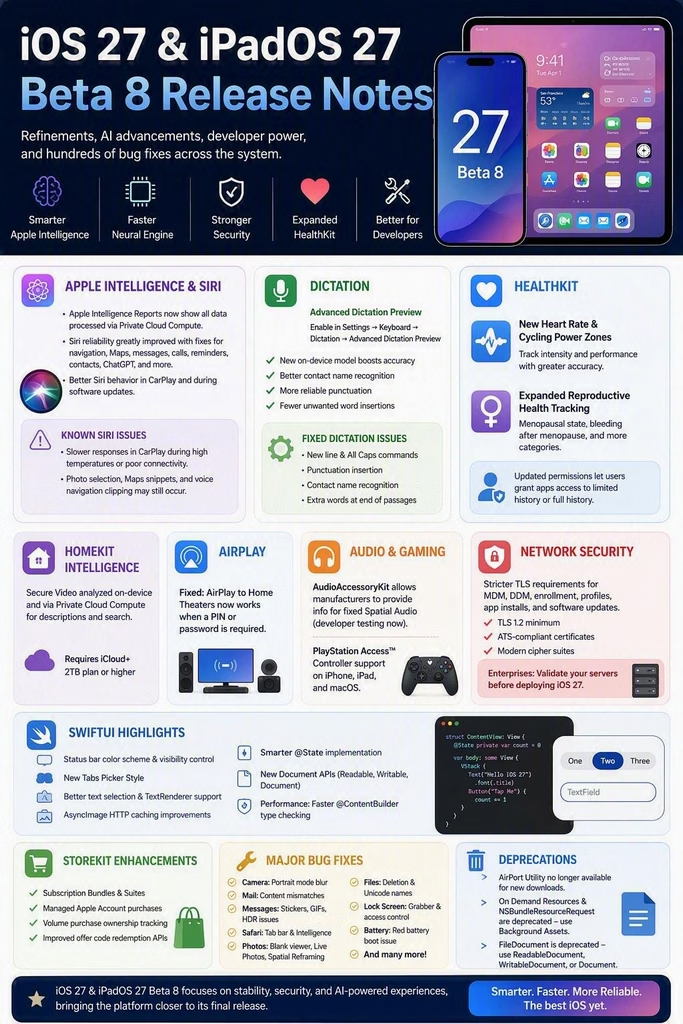
Apple has released iOS 27 Beta 8 and iPadOS 27 Beta 8, delivering another refinement-focused update as the platforms move closer to public release. While this beta does not introduce major user-facing interface changes, it significantly improves the Apple Intelligence experience, Siri reliability, developer frameworks, AI performance, networking security, HealthKit capabilities, and overall system stability.
For developers, enterprise IT teams, and Apple ecosystem enthusiasts, Beta 8 represents one of the most polished iterations of iOS 27 and iPadOS 27 to date.
Highlights of iOS 27 & iPadOS 27 Beta 8
This release focuses on:
- Enhanced Apple Intelligence infrastructure
- Improved Neural Engine performance
- Expanded HealthKit APIs
- New Dictation model with better on-device accuracy
- HomeKit Intelligence enhancements
- StoreKit and SwiftUI improvements
- Enterprise-grade TLS security requirements
- Hundreds of bug fixes across Siri, CarPlay, Photos, Safari, Mail, Messages, and System Services
Apple Intelligence Continues to Mature
Apple continues strengthening its AI platform with meaningful improvements.
Neural Engine Enhancements
iOS 27 now introduces several important changes for AI workloads:
Key Improvements
- Faster loading for AI models larger than 1 GB
- Better Neural Engine resource management
- Enhanced visibility of Neural Engine memory usage in developer tools
- More accurate memory attribution to applications
- New entitlement required for background inference processing
These changes provide developers with greater transparency into AI resource consumption while enabling more predictable performance for on-device models.
Apple Intelligence Reports Improved
Apple fixed an issue where some Home Intelligence requests processed through Private Cloud Compute were not appearing inside Apple Intelligence Reports.
This improvement provides users with better visibility into how Apple Intelligence processes their requests while maintaining Apple’s privacy-first architecture.
Siri Gets One of Its Biggest Reliability Updates Yet
A substantial number of Siri issues have been resolved in Beta 8.
Fixed Siri Issues Include
- Navigation preferences now correctly pass to supported apps
- Improved Maps search reliability
- Better contact resolution when multiple contacts share the same name
- Fixed recurring reminder creation failures
- Improved call initiation reliability
- Fixed message-sending failures
- Better email composition support
- Improved photo search handling
- Enhanced Siri behaviour in CarPlay
- Fixed various ChatGPT integration issues
Known Siri Issues
Users may still experience:
- Slower Siri responses in CarPlay during high temperatures or weak connectivity
- Photo-selection inconsistencies after Siri photo searches
- Incomplete Maps response snippets
- Occasional clipping of navigation voice prompts
Despite these remaining issues, Siri is considerably more stable compared with earlier iOS 27 beta releases.
New Dictation Experience Powered by Device AI
One of the most impressive additions in Beta 8 is the new Dictation architecture.
Advanced Dictation Preview
Users can enable:
Settings → Keyboard → Dictation → Advanced Dictation Preview
Benefits include:
- Improved speech recognition accuracy
- Better handling of contact names
- More reliable punctuation insertion
- Reduced accidental word additions
Apple has also fixed several dictation bugs related to:
- New line commands
- Capitalisation commands
- Contact name recognition
- Unwanted text insertion
For professionals who rely heavily on voice input, this update delivers a noticeable quality improvement.
HealthKit Receives Significant Expansion
Developers building health and fitness applications gain powerful new capabilities.
New Heart Rate & Cycling Power Zones
HealthKit now supports:
- Heart rate zones
- Cycling power zones
These additions allow applications to analyse workout intensity more effectively and deliver richer training insights.
Expanded Reproductive Health Tracking
HealthKit now includes:
- Menopausal status tracking
- Bleeding after menopause tracking
- Additional reproductive health categories
This represents one of the most meaningful health-data expansions introduced in recent iOS releases.
HomeKit and Smart Home Intelligence
Apple continues integrating Apple Intelligence throughout Home experiences.
Intelligent Home Video Search
When Apple Intelligence is enabled:
- HomeKit Secure Video footage can be analysed
- Video descriptions are generated
- Natural language search is supported
Processing occurs through:
- On-device intelligence
- Private Cloud Compute
Apple notes that Home Intelligence requires:
- iCloud+ subscription
- 2TB tier or higher
Audio and AirPlay Improvements
AirPlay
Apple resolved a notable issue affecting Home Theater users.
Fixed
- AirPlay to Home Theater systems now functions properly when a PIN or password is required.
This improves compatibility with secured speaker and home entertainment configurations.
AudioAccessoryKit Enhancements
Third-party audio manufacturers can now:
- Provide headphone information directly to iOS
- Support fixed Spatial Audio experiences
Initially available for developer testing, this capability is expected to arrive for EU customers in a future release.
Gaming Enhancements
PlayStation Access Controller Support
Gamers will appreciate new accessibility improvements.
Supported platforms now include:
- iPhone
- iPad
- macOS
Users can:
- Create custom control profiles
- Save accessibility configurations
- Synchronise settings with Apple devices
This expands Apple’s already strong accessibility ecosystem.
SwiftUI Gains Major Developer Improvements
The SwiftUI framework continues evolving rapidly.
Key updates include:
Visual and UI Enhancements
- Status bar colour scheme control
- Conditional status bar visibility
- New tab picker style
- Improved text selection support
- Better AsyncImage caching
- Enhanced document management APIs
Performance Improvements
- Faster @ContentBuilder type checking
- Smarter @State implementation
- Reduced unnecessary object creation
Developers targeting iOS 27 should see better UI responsiveness and simpler code maintenance.
Network Security Requirements Tightened
A major enterprise-focused change arrives in Beta 8.
Stricter TLS Standards
Starting with iOS 27:
The following services require stronger TLS security:
- Mobile Device Management (MDM)
- Declarative Device Management (DDM)
- Automated Device Enrollment
- Configuration profile deployment
- App installation services
- Software update infrastructure
Minimum requirements now include:
- TLS 1.2 support
- ATS-compliant certificates
- Modern cipher suites
Enterprise Impact
For organisations managing iPhones and iPads through Intune, Jamf, Workspace ONE, or other MDM platforms, validating certificate and server compliance before iOS 27 deployment should be considered a priority.
StoreKit Receives Enterprise and Subscription Enhancements
StoreKit continues evolving for modern commerce experiences.
New capabilities include:
- Subscription Bundles support
- Subscription Suites support
- Managed Apple Account purchases
- Enhanced offer redemption APIs
- Volume purchase ownership tracking
Developers building subscription-based services gain more flexibility when managing complex subscription ecosystems.
Major User-Facing Bug Fixes
Beta 8 contains extensive quality improvements across the operating system.
Camera
✅ Fixed Portrait mode blur rendering issues
✅ Fixed emails displaying content that did not match the subject line
Messages
✅ Fixed sticker visibility issues
✅ Fixed GIF rendering problems
✅ Fixed HDR screenshot sharing problems
Safari
✅ Fixed disappearing tab bar
✅ Improved Safari Intelligence reliability
Photos
✅ Fixed blank photo viewer issues
✅ Fixed Live Photo sharing problems
✅ Fixed Spatial Reframing rendering defects
Files
✅ Fixed deleting files from Recently Deleted
✅ Improved Unicode filename handling
Lock Screen
✅ Fixed misplaced Lock Screen grabber
✅ Fixed Siri accessibility while device is locked
Battery
✅ Fixed devices getting stuck on red battery recovery screen
Deprecations Developers Should Know
AirPort Utility
AirPort Utility is no longer available for new downloads from the App Store.
Existing users who previously downloaded the app can continue to re-download it, but functionality on iOS 27 is no longer guaranteed.
On Demand Resources
Apple officially deprecates:
- On Demand Resources (ODR)
- NSBundleResourceRequest
Developers should migrate to:
Background Assets
FileDocument
SwiftUI developers should move toward:
- ReadableDocument
- WritableDocument
- Document
instead of FileDocument.
Final Thoughts
iOS 27 Beta 8 and iPadOS 27 Beta 8 are less about new visual features and more about platform maturity. Apple is clearly focusing on reliability, AI infrastructure, developer experience, networking security, and ecosystem stability ahead of the final release.
The most notable advancements include stronger Apple Intelligence integration, Neural Engine optimisation, improved Siri reliability, advanced on-device Dictation, expanded HealthKit capabilities, enterprise security enhancements, and a massive collection of bug fixes across the operating system.
For developers, IT administrators, and Apple power users, Beta 8 delivers a clear indication that iOS 27 and iPadOS 27 are approaching release-quality readiness while laying the foundation for Apple’s next generation of AI-powered experiences.