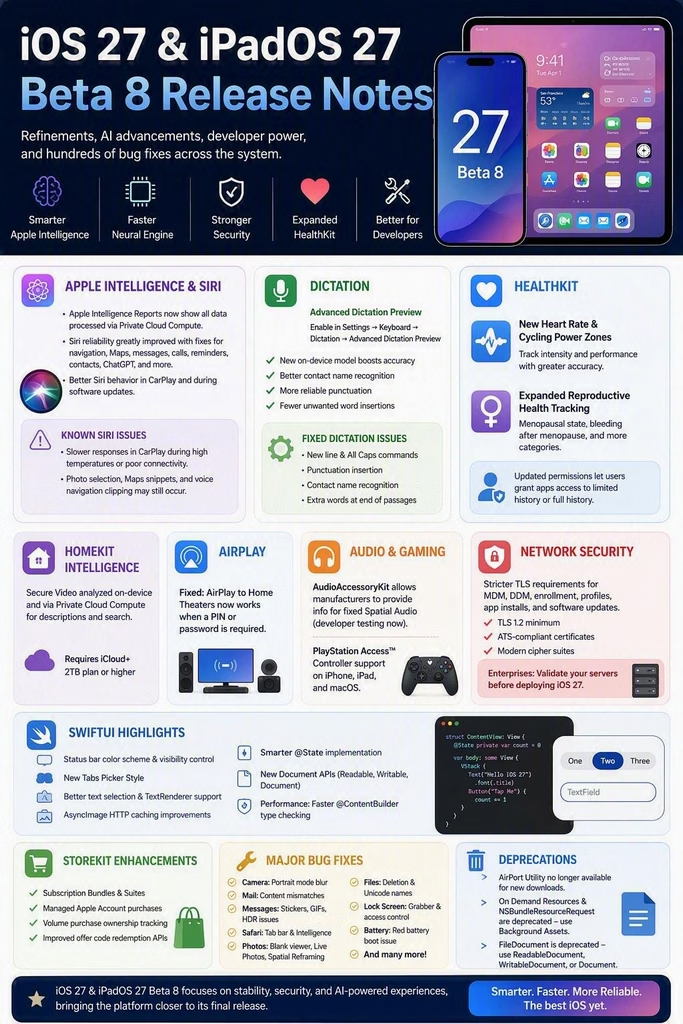
Apple has released macOS 27 Golden Gate Beta 8, delivering one of the most significant refinement updates in the beta cycle. While this release focuses heavily on stability and bug fixes, it also introduces major updates for Apple Intelligence, AI development, AppKit, SwiftUI, Virtualization, enterprise security, and the transition away from Intel-era technologies.
For developers, enterprise IT administrators, platform engineers, and Apple enthusiasts, Beta 8 offers a clear view of where macOS is heading as Apple prepares for the final release.
What’s New in macOS 27 Beta 8?
This beta focuses on five major themes:
- Apple Intelligence platform maturity
- Advanced AI and Neural Engine capabilities
- Enterprise-grade security enhancements
- AppKit and SwiftUI modernization
- Apple Silicon transition readiness
Additionally, hundreds of fixes improve reliability across Finder, Mail, Safari, Siri, Messages, StoreKit, Virtualization, APFS, and system services.
Apple Intelligence Continues to Expand Across macOS
Apple’s AI strategy continues to mature in Beta 8.
Improved Apple Intelligence Transparency
Apple fixed an issue where Home Intelligence requests processed through Private Cloud Compute were not always appearing in the Apple Intelligence Report.
This improves transparency by giving users more complete visibility into AI interactions processed using Apple’s privacy-preserving cloud infrastructure.
HomeKit Intelligence Arrives on macOS
A significant addition in this release is the expansion of Apple Intelligence into smart home experiences.
New Home Intelligence Capabilities
HomeKit Secure Video recordings can now be:
- Processed on-device
- Enhanced using Private Cloud Compute
- Indexed with AI-generated descriptions
- Searched using natural language
Apple notes that Home Intelligence requires:
- Apple Intelligence enabled
- iCloud+ subscription
- Minimum 2TB storage tier
This represents one of the most practical applications of Apple Intelligence introduced so far.
Core AI Gets Major Performance Improvements
Developers building AI-powered applications receive significant upgrades.
Neural Engine Enhancements
macOS 27 introduces:
Improved Large Model Performance
- Faster loading for AI models larger than 1GB
- Better Neural Engine allocation management
- More accurate memory attribution
- Greater visibility in development tools
New Background Inference Controls
Applications performing AI inference while running in the background now require a new entitlement:
com.apple.developer.background-tasks.continued-processing.inference
This creates a more secure and predictable AI execution environment.
Core AI Bug Fixes
Apple resolved numerous AI-related issues including:
- Model specialization failures
- Dynamic tensor processing crashes
- AIModelCache inconsistencies
- Neural Engine execution failures
- AOT compilation problems
- CoreAI and Metal validation conflicts
These fixes should significantly improve reliability for local AI workloads.
Siri Receives One of Its Largest Stability Updates
Siri remains a major focus area in Beta 8.
Apple fixed dozens of issues including:
Improved Siri Features
✅ Better contact resolution
✅ Improved reminder handling
✅ Better Maps integration
✅ Enhanced message delivery reliability
✅ Better ChatGPT integration
✅ Improved Spotlight indexing support
✅ Better email sender recognition
✅ Correct note interaction support
✅ Improved recurring reminder creation
Remaining Siri Known Issues
A few issues persist:
Photo Selection Problems
When selecting photos after a Siri search result:
- Siri may act on all displayed photos
- Selected photo context might be lost
Photo Voice Interaction Limitations
Users still cannot reference photos verbally using:
- “Photo 1”
- “Photo 2”
- Similar positional descriptions
Context Menu Behaviour
“Ask Siri” may occasionally appear even when Siri is disabled.
Overall, Siri stability has improved dramatically compared to earlier beta releases.
Enterprise IT Teams Should Pay Attention
One of the most important changes in Beta 8 affects managed environments.
Stronger Network Security Requirements
macOS 27 now enforces stricter TLS requirements for critical services.
Affected workflows include:
- MDM
- Declarative Device Management
- Automated Device Enrollment
- Configuration Profiles
- App Deployment
- Software Updates
Minimum Requirements
Organizations must ensure:
- TLS 1.2 support
- ATS-compliant certificates
- Modern cipher suites
Why This Matters
Organizations using:
- Microsoft Intune
- Jamf Pro
- Workspace ONE
- Kandji
- Mosyle
should validate server infrastructure before deploying macOS 27 broadly.
AppKit Receives Significant Modernization
macOS developers continue benefiting from AppKit enhancements.
Pull-To-Refresh Comes to AppKit
A standout addition is:
NSRefreshController
Developers can now provide native pull-to-refresh experiences inside:
NSScrollView
This brings AppKit closer to modern mobile interaction patterns.
Accessibility and Navigation Improvements
New semantic roles now support:
- Toolbar groups
- Segmented controls
- Tab navigation
VoiceOver can correctly interpret controls as:
- Tabs
- Actions
- Value selectors
This improves accessibility across macOS applications.
New AppKit User Experience Improvements
Highlights include:
- Cmd-Shift-F opens Recent items
- Better Open/Save panel keyboard navigation
- Enhanced window resize management
- Improved title bar accessory rendering
- Modernized menu image handling
SwiftUI Continues Rapid Evolution
SwiftUI gains a wide range of enhancements.
New Developer Features
AsyncImage Improvements
SwiftUI now automatically respects:
- HTTP caching headers
- Server-controlled image caching
Developers gain better performance with minimal code changes.
Smarter @State
A major update prevents repeated evaluation of:
@State private var model = Model()
Benefits include:
- Better performance
- Lower memory overhead
- Cleaner view lifecycle management
Modern Document Architecture
Apple continues its transition away from FileDocument.
New recommendations include:
- ReadableDocument
- WritableDocument
- Document
with new support for:
- Async reading
- Async writing
- Progress reporting
- URL-based document workflows
Apple Silicon Transition Accelerates
macOS 27 sends a clear signal regarding Intel software.
Intel Applications Now Flagged
Settings now identifies:
- Intel-only applications
- Apps incompatible with macOS 28
- Unused Intel software
Apple may even recommend links to Apple Silicon-native versions.
Rosetta Changes
Important updates:
- Apps previously forced to use Rosetta now launch natively
- Rosetta is not automatically restored after upgrade
- Installer packages default to ARM64
Big Warning for Enterprises
Apple reiterates:
Intel-based software will no longer be supported in macOS 28, excluding specific legacy games.
Organizations should begin auditing:
- Browser plugins
- Audio plugins
- HAL extensions
- Color Pickers
- Spotlight extensions
- QuickLook extensions
now rather than waiting for macOS 28 deployment deadlines.
Virtualization and Developer Infrastructure Improvements
Virtualization continues to improve steadily.
New Features
Loopback Port Forwarding
VM networking gains:
- vmnet loopback port forwarding support
This simplifies local development and testing environments.
DiskImageKit Framework
Developers can now build and manage:
- Apple Sparse Images
- Raw disk images
- Virtualization storage containers
using native Swift APIs.
This is a substantial improvement for virtualization tooling.
Gaming Sees Notable Enhancements
PlayStation Access Controller Support
macOS now supports:
- PlayStation Access Controller
- Custom accessibility profiles
- Cross-device profile syncing
Legacy Intel Games Support
Apple introduces:
sudo game-test-tool enable
This capability enables Intel game compatibility testing on Apple Silicon during beta releases.
Apple warns:
- Rosetta becomes disabled
- Non-gaming apps may behave unexpectedly
This feature is intended strictly for game compatibility testing.
Major User-Facing Bug Fixes
Beta 8 delivers a lengthy list of quality improvements.
System
✅ APFS metadata corruption false alarms fixed
✅ Startup Disk issues improved
✅ Dock behaviour corrected
✅ Terminal responsiveness improved
Finder
✅ Better AI-generated folder naming suggestions
✅ Smart Mailboxes update correctly
Messages
✅ HDR screenshot fixes
✅ GIF and image sizing fixes
Safari
✅ Sidebar editing functions restored
✅ Safari Intelligence reliability improved
Music
✅ Music Visualizer no longer displays black screens
News
✅ Configuration profile launch crash fixed
Important Deprecations
Developers should start planning migrations immediately.
AirPort Utility
No longer included in new clean installations.
CoreStorage
Encrypted HFS+ is deprecated.
Migration path:
Encrypted APFS
DVDPlayback Framework
Removed from the SDK.
FileDocument
Deprecated in favour of:
- Document
- ReadableDocument
- WritableDocument
TCC Direct Database Access
Applications can no longer directly access TCC databases.
Final Thoughts
macOS 27 Golden Gate Beta 8 is arguably the most polished release of the beta cycle so far. Apple continues investing heavily in Apple Intelligence, AI infrastructure, enterprise security, AppKit modernization, SwiftUI maturity, virtualization, and Apple Silicon readiness.
For enterprise administrators, the stronger TLS requirements and Intel software warnings are perhaps the most important changes. For developers, Core AI, AppKit, SwiftUI, StoreKit, and virtualization enhancements provide powerful new capabilities while removing many of the rough edges present in earlier betas.
The overall message from Beta 8 is clear: macOS 27 is rapidly approaching release quality, and Apple is preparing the ecosystem for an AI-first, Apple Silicon-only future.