Introduction
Windows 11 continues to evolve through Microsoft’s annual feature update cadence. With Windows 11 version 25H2 now established and Windows 11 version 26H2 announced as the next annual update, organisations are entering a new phase of Windows lifecycle management that prioritises continuous innovation, enablement packages, platform stability, AI integration, security hardening, and enterprise readiness.
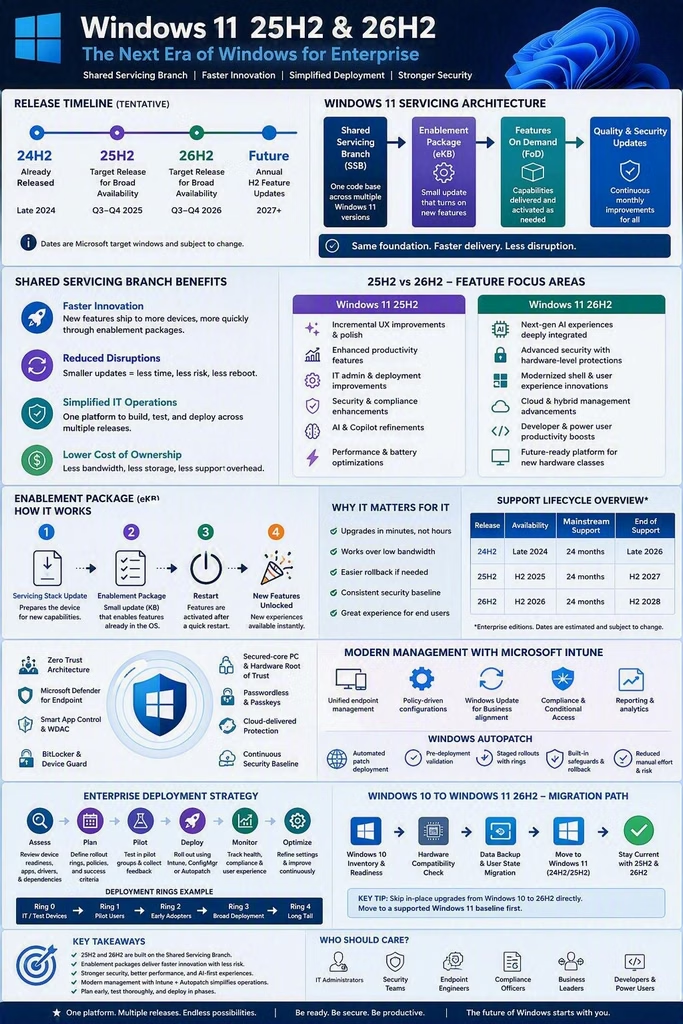
According to Microsoft’s Windows IT Pro and Windows Insider announcements, Windows 11 version 26H2 shares the same servicing branch as versions 24H2 and 25H2 and will be delivered through a lightweight enablement package rather than a traditional operating system replacement. This represents a significant shift in Microsoft’s modern servicing strategy and changes how enterprises approach testing, deployment, compliance, and lifecycle management.
This comprehensive technical deep dive explores Windows 11 25H2 and the upcoming Windows 11 26H2 update from an enterprise, architecture, security, operations, endpoint management, and user experience perspective.
Understanding Microsoft’s Modern Windows Release Strategy
Historically, Windows feature updates were major operating system upgrades that introduced platform changes, compatibility challenges, application validation efforts, and extensive deployment planning.
Modern Windows releases have evolved considerably.
Microsoft now deploys many new capabilities continuously through monthly cumulative updates while keeping features dormant until they are activated through enablement packages. This servicing model enables:
- Faster upgrades
- Reduced deployment risk
- Simplified validation
- Improved application compatibility
- Lower operational disruption
- More predictable servicing lifecycles
For enterprises managing thousands of devices through Microsoft Intune, Configuration Manager, Windows Autopatch, and Windows Update for Business, this servicing model significantly reduces administrative burden.
Versions 24H2, 25H2, and 26H2 share a common code base and servicing branch, meaning many features already exist within deployed systems before activation.
Windows 11 25H2 Overview
Windows 11 25H2 serves as Microsoft’s 2025 feature update and represents the maturation of the modern Windows servicing model.
Key strategic goals include:
- Improved enterprise security
- Enhanced AI capabilities
- Better endpoint management
- Performance optimisation
- Streamlined update experiences
- Extended hardware support alignment
- Increased reliability
For enterprises, 25H2 has become an important transition release that bridges earlier Windows 11 generations and the upcoming Windows 11 26H2 update.
Key Enterprise Themes in 25H2
1. AI Integration
Microsoft continues embedding AI-powered experiences throughout Windows.
Examples include:
- Copilot integration
- Intelligent search capabilities
- Context-aware recommendations
- Productivity enhancements
- Accessibility improvements
AI becomes increasingly integrated into daily workflows rather than existing as a standalone feature.
2. Security by Default
25H2 builds upon Microsoft’s Zero Trust security philosophy.
Major focus areas include:
- Credential protection
- Identity security
- Secure-by-default configurations
- Enhanced Defender integrations
- Kernel hardening
- Smart application control
- Improved attack surface reduction
3. Modern Endpoint Management
The operating system increasingly assumes cloud-managed deployment models.
Enterprise administrators gain better integration with:
- Microsoft Intune
- Windows Autopatch
- Azure AD
- Microsoft Entra ID
- Microsoft Defender XDR
- Windows Update for Business
Windows 11 26H2: What Microsoft Has Officially Announced
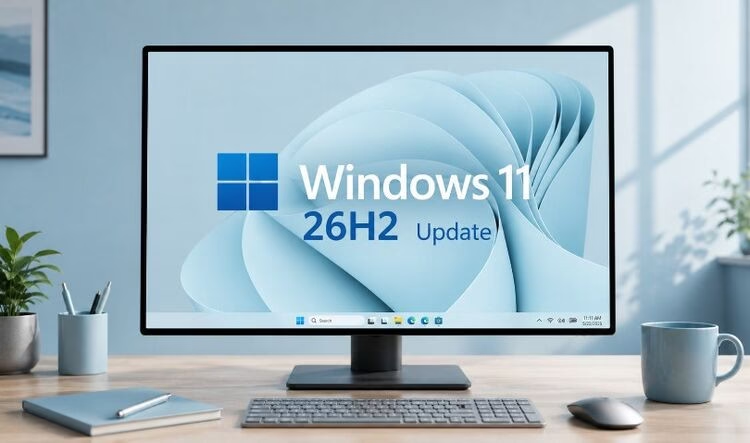
Microsoft has publicly confirmed Windows 11 version 26H2 and has made preview builds available through the Release Preview Channel. Microsoft states that versions 24H2, 25H2, and 26H2 use a shared servicing branch and that 26H2 will be delivered through an enablement package. Microsoft also notes that several commercial features introduced previously will become enabled by default in 26H2. Source: Microsoft Windows Insider Blog and Windows IT Pro Blog.
Why 26H2 Matters
Many IT leaders initially view 26H2 as a small release.
However, from an enterprise perspective it represents a major milestone because it:
- Extends support lifecycles
- Enables dormant enterprise features
- Simplifies deployment
- Reduces upgrade risk
- Strengthens platform consistency
- Improves operational stability
The importance of 26H2 lies less in radical UI changes and more in refinement, optimisation, and enterprise readiness.
The Enablement Package Revolution
One of the most important aspects of Windows 11 26H2 is its delivery model.
Traditional Feature Updates
Traditional upgrades required:
- OS image replacement
- Hours of validation
- Application compatibility testing
- Driver testing
- Significant bandwidth consumption
- Long installation times
Enablement Package Updates
The new model provides:
- Smaller download sizes
- Faster deployment
- Faster restart cycles
- Less user disruption
- Reduced change-management complexity
For organisations operating global fleets of laptops, desktops, VDI environments, and hybrid workstations, these advantages are substantial.
Platform Architecture
Shared Platform Design
Microsoft has confirmed that:
- Windows 11 24H2
- Windows 11 25H2
- Windows 11 26H2
share the same servicing branch.
This architecture provides:
Consistent Driver Compatibility
Hardware drivers validated for 24H2 remain compatible with later releases.
Application Stability
Enterprise application compatibility remains significantly more predictable.
Reduced Regression Risk
Less platform divergence results in fewer unexpected issues.
Faster Rollouts
Because core components already exist, updates become much faster to install.
Enterprise Deployment Strategy
Recommended Pilot Structure
Organisations should adopt phased deployment.
Ring 0
- IT administrators
- Endpoint engineering teams
- Workplace technology teams
Ring 1
- Power users
- Development teams
- Technical business units
Ring 2
- Operational departments
- Shared services
Ring 3
- Enterprise-wide deployment
This model remains valid for both 25H2 and 26H2.
Microsoft Intune Considerations
Endpoint administrators using Intune should prepare for:
Update Rings
Review:
- Deadlines
- Grace periods
- Feature update policies
- Rollback periods
Compliance Policies
Validate:
- Device compliance requirements
- OS version restrictions
- Conditional Access dependencies
Autopatch Integration
26H2 aligns naturally with Microsoft’s automated patching strategy.
Benefits include:
- Faster feature deployment
- Reduced administration
- Improved reporting
- Policy consistency
Security Enhancements
Security remains Microsoft’s most significant investment area.
Identity Protection
Security increasingly centres on identity.
Enhancements include continued support for:
- Windows Hello for Business
- Passkeys
- Multi-factor authentication
- Conditional Access
- Entra ID integration
Credential Security
Modern Windows introduces stronger credential isolation.
Benefits:
- Reduced credential theft
- Stronger authentication
- Improved resilience to ransomware
Microsoft Defender Enhancements
Enterprises should expect ongoing improvements to:
Defender Antivirus
Including:
- Better behavioural analysis
- Improved cloud intelligence
- Expanded threat visibility
Defender for Endpoint
Capabilities include:
- Threat hunting
- Attack path analysis
- Risk prioritisation
- Automated remediation
Defender XDR
Providing unified security visibility across:
- Endpoints
- Identities
- Applications
- Cloud workloads
AI and Copilot Evolution
AI represents one of the defining themes of modern Windows.
Windows Copilot Maturity
25H2 accelerated Copilot adoption.
26H2 is expected to continue integrating AI deeper into:
- User productivity
- Search experiences
- System assistance
- Accessibility workflows
Enterprise Benefits
Potential advantages include:
- Faster information retrieval
- Context-aware assistance
- Reduced support effort
- Greater user productivity
Taskbar and User Interface Improvements
Microsoft has indicated ongoing refinement rather than radical redesign.
Areas receiving attention include:
Taskbar
Potential improvements:
- Better scaling
- Enhanced space management
- More flexibility
Start Menu
Focus areas:
- Faster search
- Better discoverability
- Efficient navigation
Desktop Experience
Expected goals include:
- Productivity improvements
- Cleaner workflows
- Better personalisation
Accessibility Improvements
Accessibility continues to be a major investment area.
Key themes include:
Magnifier Enhancements
Better visibility capabilities for users with visual impairments.
Screen Tint Features
Expanded readability and visual comfort support.
Keyboard Navigation
Improved accessibility pathways.
Search Accessibility
Better discoverability across Windows experiences.
Performance Engineering
A notable theme around 26H2 is performance refinement.
Microsoft increasingly focuses on:
Responsiveness
Areas include:
- Faster app launches
- Reduced latency
- Improved multitasking
Resource Management
Optimisations target:
- CPU usage
- Memory handling
- Background processing
Battery Efficiency
Especially important for:
- Hybrid workers
- Mobile professionals
- Enterprise laptops
Storage and File Explorer Improvements
Microsoft continues modernising File Explorer.
Expected areas of enhancement include:
File Discoverability
Users increasingly rely on search-driven workflows.
Cloud Integration
Improved experiences across:
- OneDrive
- SharePoint
- Microsoft 365
Productivity Enhancements
Better file interactions improve daily efficiency.
Networking Improvements
Networking remains critical in hybrid work environments.
Focus areas include:
- Wi-Fi reliability
- VPN integration
- Network diagnostics
- Cloud-connected experiences
Enterprise benefits include reduced support incidents and improved remote connectivity.
Hybrid Work Readiness
Workplace computing has permanently changed.
Windows 11 25H2 and 26H2 continue evolving around hybrid work requirements.
Key priorities:
- Remote management
- Secure connectivity
- Cloud-first administration
- Anywhere productivity
For SRE, infrastructure, workplace engineering, and digital workplace teams, these improvements simplify large-scale device management.
Windows Update Optimisation
Modern update management is dramatically different from earlier Windows generations.
Reduced Downtime
Enablement packages minimise interruption.
Improved Predictability
Shared servicing branches support more reliable deployments.
Better Reporting
Integrated telemetry provides stronger deployment visibility.
Endpoint Analytics Opportunities
Organisations should leverage:
- Endpoint Analytics
- Intune reporting
- Update Compliance
- Microsoft Graph reporting
These solutions help measure:
- Update success
- Device health
- Performance trends
- User experience metrics
Virtual Desktop Infrastructure Considerations
VDI and Cloud PC environments benefit significantly.
Azure Virtual Desktop
Benefits include:
- Simplified image management
- Predictable servicing
- Reduced update complexity
Windows 365
Cloud PC environments gain:
- Consistent experiences
- Easier lifecycle management
- Faster feature adoption
Security Operations Implications
SOC teams should anticipate:
- New telemetry sources
- Improved threat intelligence integration
- Expanded detection opportunities
- Enhanced security visibility
Modern Windows increasingly acts as a security sensor in the broader Microsoft security ecosystem.
What Enterprises Should Test Before Deployment
Key validation areas include:
Identity Services
Validate:
- Entra ID
- Federation services
- MFA workflows
Core Applications
Validate:
- ERP systems
- Finance applications
- CRM platforms
- Browser-dependent applications
Security Tools
Validate:
- EDR platforms
- DLP tools
- Vulnerability scanners
Hardware
Validate:
- Drivers
- Peripherals
- Docking stations
- Printers
Comparison: Windows 11 25H2 vs Windows 11 26H2
| Area | Windows 11 25H2 | Windows 11 26H2 |
| Servicing Model | Enablement-based | Enablement-based |
| Platform Branch | Shared | Shared |
| Deployment Complexity | Low | Very Low |
| Security | Strong | Further refined |
| AI Integration | Expanded | Further integrated |
| Enterprise Readiness | High | Very High |
| Update Speed | Fast | Faster |
| User Impact | Low | Minimal |
Strategic Recommendations for IT Leaders
Prioritise Lifecycle Planning
Organisations should align 26H2 deployment with:
- Support timelines
- Hardware refresh cycles
- Security initiatives
Expand Intune Adoption
Modern servicing benefits organisations embracing:
- Cloud management
- Autopatch
- Update rings
Strengthen Security Baselines
Use deployment projects to:
- Review security posture
- Update baselines
- Enhance compliance controls
Measure User Experience
Track:
- Login times
- Application performance
- Device reliability
- Support ticket volumes
The Future Beyond 26H2
Windows engineering increasingly focuses on:
- AI-driven experiences
- Security-first architecture
- Cloud-native management
- Continuous innovation
The distinction between major releases and cumulative updates continues to blur.
Enterprises should expect a future where Windows evolves continuously, with feature updates serving more as activation points than traditional operating system replacements.
Final Thoughts
Windows 11 25H2 and Windows 11 26H2 are significant not because they radically redesign the operating system, but because they demonstrate Microsoft’s mature servicing strategy. The combination of a shared platform, enablement-based upgrades, stronger security, cloud-native management, deeper AI integration, improved accessibility, and enterprise-focused refinements offers a compelling roadmap for organisations modernising endpoint computing.
For enterprise architects, SRE leaders, platform engineering teams, digital workplace teams, infrastructure operations teams, and security professionals, the upcoming transition from Windows 11 25H2 to Windows 11 26H2 should be one of the lowest-risk feature update cycles in Windows history while still delivering meaningful improvements in security, manageability, performance, and user productivity.
As Microsoft continues refining Windows around AI, automation, and cloud-connected experiences, Windows 11 26H2 represents another important milestone in the evolution of the modern enterprise desktop.