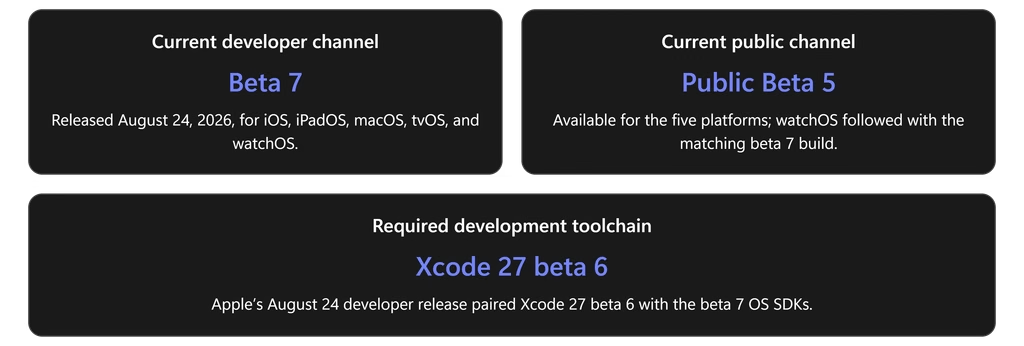
Apple’s version 27 platform cycle is not simply a collection of annual feature updates. It is a coordinated modernization of the company’s operating systems around five priorities: Siri AI and Apple Intelligence, privacy-preserving compute, consistent application design, declarative enterprise management, and performance refinement. Apple’s current developer builds are beta 7 across all five platforms; the corresponding public channel has reached public beta 5.apple+1
The most consequential change for developers is the expansion of Apple’s intelligence stack. The Foundation Models framework now supports Apple models, conforming third-party providers, multimodal input, Dynamic Profiles, server-backed models, and an Evaluations framework. App Intents connects application entities and actions to Siri AI and Spotlight, while the new Core AI framework lets developers run custom models locally on Apple silicon.
For IT organizations, the headline is equally significant. Version 27 introduces broader Declarative Device Management configurations, proactive status reporting, legacy profiles delivered as declarative assets, remote AppleCare log collection, new Return to Service options, and stricter TLS requirements for management infrastructure. Legacy software-update commands no longer function on version 27 operating systems, making declarative update management a deployment prerequisite rather than an optional modernization project.
Understanding the beta evidence
This article uses three evidence classifications:
- Officially announced: Documented on Apple product pages, Newsroom releases, WWDC guides, or deployment documentation. These are confirmed preview capabilities, but remain subject to change.
- Documented in the current beta: Present in Apple’s beta 7 SDK release notes as a new feature, behavior change, deprecation, resolved issue, or known issue.
- Public-beta observation: Used only to establish public build availability or late-cycle behavior when Apple’s public beta portal does not publish numbered build history.
Apple’s August 24 release feed lists iOS and iPadOS 27 beta 7 build 24A5424a, macOS 27 beta 7 build 26A5421a, tvOS 27 beta 7 build 24J5358a, and watchOS 27 beta 7 build 24R5358a. Apple’s portal confirms all five systems are in the Apple Beta Software Program; independent reporting identifies the matching public releases as public beta 5.
The shared architecture behind OS 27
At the experience layer, Liquid Glass receives improved contrast, more uniform refraction, sharper icons, and user-adjustable transparency. Beneath that is a shared intelligence architecture: Siri AI can use on-device models, Private Cloud Compute, Spotlight, App Intents, and system actions while Apple says personal data processed through Private Cloud Compute is neither stored nor made accessible to Apple.
The following diagram shows how the major layers relate across the five platforms.
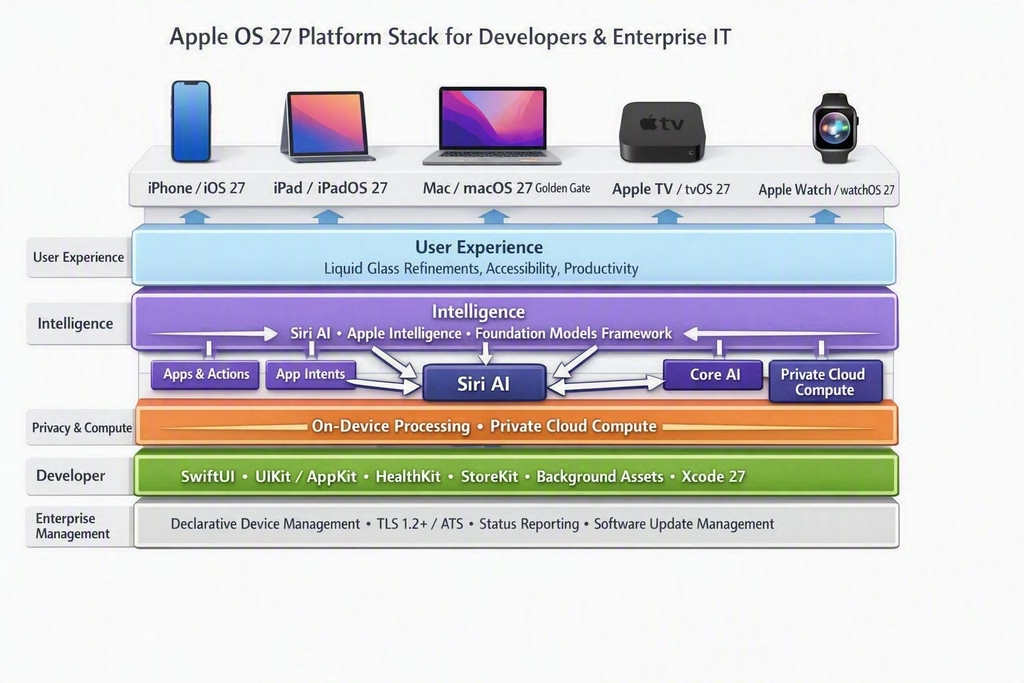
Apple’s OS 27 strategy is a layered platform: consistent experience and frameworks above privacy-preserving intelligence and declarative enterprise controls, with platform-specific capabilities at the device edge.
For enterprises, this architecture means that AI decisions cannot be separated from identity, application exposure, network readiness, regional availability, and device eligibility. Apple provides declarative controls for Apple Intelligence, external intelligence providers, Siri, keyboards, application-specific intelligence, and Apple Intelligence reporting, but also notes that additional controls for Siri AI and Visual Intelligence are planned for later beta releases.
iOS 27: Intelligence becomes an operating-system interface
User and productivity experience
Siri AI is the center of iOS 27. It supports natural, multi-turn conversations, web knowledge, personal-context searches across content such as Mail, Messages, Photos, and Notes, onscreen awareness, and systemwide application actions. A dedicated Siri app privately synchronizes conversation history through iCloud, while Siri mode in Camera introduces visual search and actions directly from the viewfinder.
Apple Intelligence extends into daily workflows. Photos adds Spatial Reframing, Extend, and an enhanced Clean Up tool. Safari can organize tabs by topic and monitor webpages through Notify Me. Passwords can identify weak or compromised credentials and, where supported, update them. Mail and Messages surface context-based suggestions, Call Context can locate relevant information during business calls, and Shortcuts can create automations from natural-language descriptions.
Apple is also expanding family protections. Setup Assistant can limit the initial set of system apps available to a child; Ask to Browse requires approval for new websites; Communication Safety expands intervention to violent or graphic imagery; and redesigned Screen Time provides category-based Time Allowances and schedules.
Performance is a stated product objective rather than a beta-only observation. Apple reports app launches up to 30 percent faster, newly captured photos loading up to 70 percent faster, and nearby AirDrop transfers up to 80 percent faster in its controlled testing. The company also cites an optimized CPU scheduler and improved cellular-to-Wi-Fi transitions; these figures should be treated as Apple benchmarks, not guaranteed fleet-wide outcomes.
Developer impact
The Foundation Models framework is now a common Swift interface for Apple Foundation Models, conforming cloud providers, multimodal prompts, tools such as OCR and barcode recognition, and Dynamic Profiles. The Evaluations framework adds purpose-built testing for model behavior, while Core AI provides memory-safe Swift APIs, hardware specialization, stateful execution, zero-copy data paths, and local inference without token charges or server dependencies.
App Intents is the primary integration route into Siri AI. Entity schemas contribute application content to Spotlight’s semantic index, intent schemas expose actions through natural language, View Annotations associate interface elements with entities, and AppIntentsTesting exercises integrations through system pathways without UI automation.
Beta 7 also contains migration-sensitive changes. iOS and iPadOS applications built with the 27 SDK must include a launch screen, and applications built with the latest SDK must use the scene-based lifecycle. On-Demand Resources and NSBundleResourceRequest are deprecated in favor of Background Assets, while background Neural Engine inference requires a new entitlement.
MetricKit gains Swift-first asynchronous reporting, memory-limit diagnostics, developer-defined state correlation, and Metal frame-rate metrics. StoreKit adds transaction states for volume-purchased content assigned to Managed Apple Accounts, while SwiftUI introduces asynchronous document protocols and changes to @State, menu imagery, selection behavior, and document handling that require source-level regression testing.
IT and security implications
Version 27 management traffic must use TLS 1.2 or later, ATS-conforming cipher suites, and valid ATS-compatible certificates. The requirement applies to MDM, DDM, Automated Device Enrollment, profile installation, application installation, enterprise distribution, and software updates; SCEP and content-cache connections are documented exceptions.
On iPhone, DDM gains proactive enrollment and device-health status, including reporting for baseband, cameras, Face ID, Touch ID, NFC, and Ultra Wideband. Supervised devices can report Lockdown Mode status, while AppleCare Enterprise customers can test remotely initiated enhanced log collection.
Backup restoration no longer restores device-management enrollment, configuration, or supervision state. Devices assigned in Apple Business Manager or Apple School Manager instead reenroll through Automated Device Enrollment. Return to Service gains automatic enrollment retry, language and region selection, user-initiated reset options, inactivity-driven initiation, and software-update enforcement during reenrollment.
iPadOS 27: A more intelligent workspace
Productivity, multitasking, and Apple Pencil
iPadOS 27 brings Siri AI into the larger-screen workflow through Spotlight, system context, screenshots, and Apple Pencil. A user can capture the screen, tap an object, or circle it with Apple Pencil to ask questions or take action. Siri can also transform typed or handwritten notes into agendas, study guides, or next steps.
Apple positions natural-language automation as a bridge between intelligence and multitasking. Its example allows a Shortcut to detect a connected keyboard, enable Windowed Apps, and tile Safari and Notes. Apple has not documented a replacement windowing model in the retrieved iPadOS 27 material; the emphasis is on automating and refining the existing productivity environment rather than introducing another fundamental multitasking redesign.
PencilKit gains handwriting recognition across a wider range of alphabets and languages, with APIs intended for applications beyond conventional drawing canvases. PaperKit provides a paper-like writing surface and low-latency inking foundation. These are meaningful opportunities for field-service, education, annotation, inspection, and document-workflow applications.
File handling receives an important performance improvement: Apple reports browsing and transferring content between iPad and an external drive at up to five times the previous speed in its prerelease testing. Calendar can create or revise events from a natural-language description, and Shared Albums gains full-resolution sharing and broader web participation.
Developer and enterprise impact
iPad developers receive the same Foundation Models, Core AI, App Intents, SwiftUI, Background Assets, StoreKit, and evaluation capabilities as iOS. Applications should specifically test continuous resizing, all supported orientations, external displays, menu-image behavior, document I/O, selectable text gestures, and Siri-triggered drag-resource loading.
Management enhancements are particularly relevant to shared and frontline deployments. New status items identify Shared iPad state and Return to Service status; supervised iPads support remote AppleCare logging; and Return to Service can preserve applications, retry enrollment, set locale, require an OS update, or begin after a configured period of inactivity.
macOS 27 Golden Gate: The Apple-silicon transition accelerates
User-facing experience
macOS 27 integrates Siri AI into Spotlight and system context menus. Visual Intelligence can analyze a selected area, image, PDF, or other onscreen content, while the dedicated Siri app synchronizes conversations across supported devices. Photos, Safari, Passwords, Shortcuts, Mail, and Messages receive the same broader intelligence capabilities found on iPhone and iPad.
The interface refinement is distinctly Mac-oriented: uniform toolbars, edge-to-edge sidebars, updated window shapes and menu-bar icons, improved contrast, and an adjustable Liquid Glass appearance. Apple also documents support for higher ultrawide-display resolutions, including configurations such as 5K at 120 Hz, with remembered display arrangements.
Architecture and application modernization
macOS 27 is a major checkpoint in the Apple-silicon migration. Apple’s developer newsletter states that it is the final macOS release to support Rosetta; after it, Intel-only applications will not run on Apple silicon except for certain older games that depend on Intel frameworks. Beta notes additionally state that installer packages without a hostArchitecture default to arm64 and that Intel plug-ins and loaders require explicit auditing.
AppKit adds NSRefreshController, semantic roles for toolbar groups and segmented controls, text-selection infrastructure, and revised menu-image behavior. DiskImageKit introduces Swift APIs for Apple Sparse Image Format and raw disk images, and Virtualization gains loopback port forwarding. SwiftUI’s new document APIs support asynchronous reads and writes, progress, direct URL access, templates, and more efficient package-document updates.
Security boundaries become stricter. Access to other developer teams’ application and group containers is denied by default and is user-manageable in Privacy & Security. XProtect can restrict access to application data frequently targeted by malware, and applications can no longer access the local TCC database directly.apple+1
For IT, macOS 27 adds declarative content-cache configuration and health reporting, remote AppleCare log collection, modern network declarations, Lockdown Mode reporting, and managed intelligence settings. It also deprecates the older com.apple.AssetCache.managed profile.
tvOS 27: Media refinement with stronger management foundations
tvOS 27 has a narrower consumer feature scope, but its media changes are clear. Apple Podcasts receives a redesigned interface, video-podcast playback, sidebar navigation, and support for show and episode artwork. Apple Music adds AutoMix on tvOS and Hi-Res Lossless output for Apple TV 4K with compatible external audio equipment.
For application teams, Apple emphasizes customizable sidebar navigation, persistent Continuity Camera connections, SwiftUI, AVKit, Metal, Picture in Picture, 4K, Dolby Vision, HDR10+, and Dolby Atmos. Beta 7 includes localized Background Assets, deprecates On-Demand Resources, updates scene restoration, and expands StoreKit for assigned volume purchases and subscription bundles.
tvOS is also part of Apple’s enterprise-management convergence. DDM can configure VPN plug-ins and IKEv2, deploy legacy profiles as integrity-verified declarative assets, report enrollment state, and initiate non-interactive AppleCare log collection on supervised Apple TV devices. The same TLS 1.2 and ATS management-traffic requirements apply.
watchOS 27: Intelligence moves to the wrist
watchOS 27 combines Siri AI, a dedicated Siri app, and a dynamic app grid that prioritizes suggested, recent, and frequently used applications. A new one-handed tap gesture selects Smart Stack widgets, while additional suggestions can surface a parked car, birthdays, transit cards, sleep-alarm changes, and other contextual items.apple+1
Workout Buddy adds progress information for distance, pace, and duration and is available in Spanish. Improved motion algorithms target more accurate treadmill distance, while Cycle Tracking adds support related to perimenopause and menopause. A unified Find My application replaces separate people, devices, and items applications, with Precision Finding on supported hardware.apple+1
Other documented refinements include faster music startup, Wallet passes created from barcodes or QR codes, Call Context, step-count synchronization, and battery-optimization suggestions. Siri AI on Apple Watch depends on an Apple Intelligence-capable iPhone nearby; Apple lists Series 9 or later, Ultra 2 or later, and SE 3 as the AI-capable watch families.apple+1
For developers, HealthKit adds heart-rate and cycling-power zones. The Foundation Models framework is present in watchOS beta documentation, while WKExtension and WKExtensionDelegate are deprecated for applications targeting watchOS 9.2 or later. Developers should test standalone connectivity, complications, Smart Stack behavior, StoreKit, workouts, and Siri/App Entity size limits.
Cross-platform strategic comparison
| trategic theme | iOS 27 | iPadOS 27 | macOS 27 | tvOS 27 | watchOS 27 |
|---|---|---|---|---|---|
| Siri AI | Full personal, visual, writing, and app-action experience | Adds screenshot and Pencil interaction | Spotlight, context menus, screen analysis | Siri management; no equivalent full Siri AI launch documented | Conversational wrist experience via supported iPhone |
| Primary productivity story | Communication, Camera, Photos, Safari, Shortcuts | Notes, Pencil, external storage, automation | Research, content creation, documents, displays | Video podcasts and premium audio | Glanceable actions, fitness, Wallet, Find My |
| Developer opportunity | AI, App Intents, Core AI, UIKit/SwiftUI | AI plus PencilKit and PaperKit | AI, AppKit, virtualization, WebKit, spatial preview | Media, Continuity Camera, StoreKit | HealthKit, workouts, widgets, App Intents |
| Enterprise priority | Fleet status, Return to Service, AI policy | Shared devices and reusable workflows | Apple-silicon migration and content caching | Managed signage and shared-space devices | Policy visibility and secure companion workflows |
| Key modernization risk | Scene lifecycle, launch screen, deprecated ODR | Resizing and Pencil/API regression | Intel software and plug-ins | Media/layout and asset migration | Hardware eligibility and standalone behavior |
Across the portfolio, Apple is moving intelligence from an application feature into a shared system service, while giving developers standardized access through App Intents, Foundation Models, and Core AI. At the same time, management shifts from command-and-query MDM toward policy-driven DDM with proactive status delivery.
Regional planning remains essential. Siri AI is initially unavailable on iOS, iPadOS, and watchOS in the European Union, although Apple says it will be available on macOS in supported languages. Siri AI and the new Apple Intelligence features are not initially available in China.
Recommended enterprise readiness plan
The following actions are editorial recommendations derived from Apple’s documented requirements, not additional Apple announcements:
- Validate, do not merely compile. Apple’s beta notes contain known Siri, Spotlight, Shortcuts, StoreKit, SwiftUI, notification, and management issues. Use current SDKs, AppIntentsTesting, model evaluations, TestFlight, and Feedback Assistant before production approval.
- Audit management endpoints now. Test production, staging, enrollment, application-distribution, update, and profile-hosting services for TLS 1.2+, ATS cipher suites, and valid certificate chains.
- Move update policy to DDM. Legacy update commands, queries, cadence settings, restrictions, and deferrals no longer function on version 27 platforms.
- Create representative beta rings. Include different enrollment types, Shared iPad, Apple TV, Return to Service, external storage, VPN, content filtering, and regional configurations. Apple recommends backups and careful release-note review before installing beta software.
- Inventory Intel dependencies. Test applications, installer scripts, audio components, print software, Quick Look extensions, Spotlight plug-ins, and other loaders natively on Apple silicon.
- Define AI governance. Decide which Apple Intelligence, external intelligence, writing, image, Visual Intelligence, reporting, and application-specific capabilities are acceptable for each data classification.
- Modernize applications. Prioritize App Intents, semantic indexing, scene lifecycle, launch screens, Background Assets, new SwiftUI document APIs, PencilKit, and HealthKit zones according to platform relevance.
Conclusion
OS 27 marks a decisive shift in Apple platform strategy. The visible story is Siri AI, but the deeper change is the alignment of intelligence, application actions, on-device compute, cloud privacy, management policy, and cross-platform frameworks. Developers gain a larger surface for intelligent and agentic applications; IT teams gain richer declarative controls and device status, but must also address TLS compliance, update-management migration, AI governance, and Apple-silicon readiness.apple+1
Because the current builds remain beta software, organizations should treat this period as a validation window—not as authorization for broad production deployment. The teams that benefit most from OS 27 will be those that test the complete system: applications, identity, networks, management services, data policy, hardware eligibility, and regional availability together.