Apple has officially launched Apple Pay in India, bringing its globally popular contactless payment platform to Indian consumers after years of anticipation. The service enables Apple users to make secure payments in stores, apps, and online using their iPhone, iPad, and Apple Watch, with Mac support expected soon.
The launch marks a significant milestone in India’s digital payments ecosystem, offering users a convenient and highly secure alternative for card-based transactions. Unlike traditional card payments, Apple Pay uses tokenization and biometric authentication, eliminating the need to enter card details, OTPs, or PINs during most transactions.
What is Apple Pay?
Apple Pay is a digital wallet and payment service developed by Apple. It allows users to securely store eligible credit cards in the Apple Wallet app and make payments using NFC (Near Field Communication) technology.
With Apple Pay, users can:
- Make contactless payments in stores.
- Pay within supported mobile apps.
- Complete purchases on supported websites.
- Use Face ID, Touch ID, or Passcode authentication for enhanced security.
Supported Banks and Cards in India
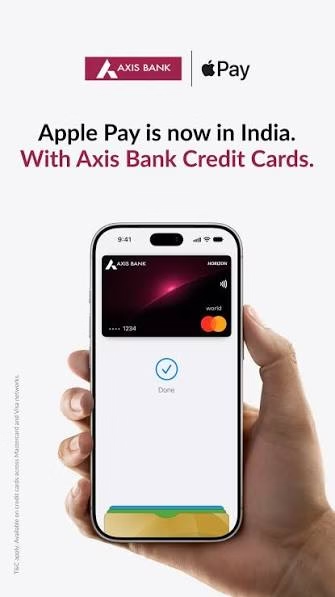
At launch, Apple Pay support in India is currently limited to a single banking partner.
Supported Bank
| Bank | Status |
|---|---|
| Axis Bank | Supported at Launch |
Axis Bank is the first Indian banking partner to support Apple Pay. Apple is reportedly in discussions with additional banks for future expansion.
Supported Card Networks
| Card Network | Support Status |
|---|---|
| Visa Credit Cards | Supported |
| Mastercard Credit Cards | Supported |
| RuPay Cards | Not Supported |
| Debit Cards | Not Supported at Launch |
| UPI Payments | Not Supported at Launch |
Currently, only eligible Axis Bank-issued Visa and Mastercard credit cards can be added to Apple Pay. RuPay cards, debit cards, and UPI-based payments are not available during the initial rollout.
Eligible Cards
Apple has confirmed support for:
- Axis Bank Visa Credit Cards
- Axis Bank Mastercard Credit Cards
More banks and card issuers are expected to be added in future phases.
Devices That Support Apple Pay in India
Apple Pay is available on:
- iPhone
- iPad
- Apple Watch
Support for Mac devices has been announced and is expected to arrive shortly.
How to Add a Card to Apple Pay in India
Setting up Apple Pay is straightforward and takes only a few minutes.
Method 1: Using Apple Wallet
- Open the Wallet app on your iPhone.
- Tap the“+” (Add Card) button.
- Select Credit or Debit Card.
- Scan your card or enter card details manually.
- Follow the on-screen instructions.
- Complete verification through Axis Bank.
- Once verified, your card will appear in Apple Wallet and be ready for use.
Method 2: Using the Axis Bank App
- Install the latest Axis Bank mobile banking app.
- Log in to your account.
- Select the eligible credit card.
- Tap Add to Apple Wallet.
- Complete verification.
- The card will automatically be added to Apple Pay.
How to Use Apple Pay for Payments
In-Store Payments
Using Apple Pay at physical retail stores is simple:
On iPhone
- Double-click the Side Button (or Home Button on supported devices).
- Authenticate using:
- Face ID
- Touch ID
- Device Passcode
- Hold your iPhone near the contactless payment terminal.
- Wait for payment confirmation.
On Apple Watch
- Double-click the side button.
- Select your card if multiple cards are added.
- Hold the watch near the NFC payment reader.
- Receive confirmation of successful payment.
In-App Payments
When shopping in supported apps:
- Select Apple Pay at checkout.
- Confirm payment using Face ID or Touch ID.
- Transaction completes instantly without entering card details.
Online Payments
For supported websites:
- Choose Apple Pay during checkout.
- Review payment information.
- Authenticate with Face ID, Touch ID, or Passcode.
- Complete the purchase securely.
Where Can Apple Pay Be Used in India?
Apple Pay is accepted at merchants that support NFC-based contactless payments. Apple has already partnered with several merchants and payment service providers across India.
Some launch partners include:
- Apple Store
- Blinkit
- Chaayos
- Croma
- Ixigo
- Tata 1mg
- Zomato
- Reliance retail brands
- Interflora
- Le15 Patisserie
The service can also be used anywhere compatible contactless readers are available.
Security Features of Apple Pay
One of Apple Pay’s biggest advantages is its security-focused architecture.
Tokenization
Your actual card number is never shared with merchants. Apple Pay generates a unique encrypted Device Account Number for each card.
Biometric Authentication
Payments require Face ID, Touch ID, or Passcode verification, reducing fraud risks.
Secure Element
Payment data is stored in Apple’s Secure Element chip, which is specifically designed to protect financial information.
Find My Protection
Users can remotely suspend Apple Pay functionality if their device is lost or stolen using the Find My service.
Apple Pay vs UPI: What’s Different?
Although Apple Pay has arrived in India, it is not intended to replace UPI.
| Feature | Apple Pay | UPI |
|---|---|---|
| Payment Source | Credit Cards | Bank Account |
| Contactless NFC Payments | Yes | Limited |
| Works Without QR Code | Yes | No |
| Card Rewards | Yes | No |
| UPI Support | No | Yes |
| Face ID/Touch ID Authentication | Yes | Depends on App |
Currently, Apple Pay focuses on card-based payments, while UPI continues to dominate account-to-account digital transactions in India.
Conclusion
The launch of Apple Pay in India represents a major step forward for contactless card payments. With support for Axis Bank Visa and Mastercard credit cards, strong security measures, seamless Apple ecosystem integration, and growing merchant acceptance, Apple Pay is positioned to become a preferred payment solution for iPhone users in India. While support is currently limited, the addition of more banks and card networks in the coming months could significantly expand its adoption and reshape premium digital payment experiences across the country.